Release Summary 26.02 | Jan 22, 2026
The following key features and improvements, along with bug fixes, have been released in Digital Experience Personalization (DXP) in the release version 26.02.
Recommend
Configurable Strategies – Enhanced Segment-Based Recommendation Support
Configurable Strategies now offer expanded support for segment-driven recommendations, allowing teams to use customer segments either as a sub-seed or as the primary context for strategy execution. A new Use Segment Models option enables segment-specific models with affinity sorting and category-based recommendations, while remaining mutually exclusive with region-based seeding to ensure predictable behavior.
Users can select one or more whitelisted segments through a dropdown, reorder them to define priority, or choose to apply all eligible segments without manual selection. When segment-based strategies are enabled, the system uses the InSegment version of supported models such as Top Sellers, Viewed Together, and Movers and Shakers. If a higher-priority segment cannot return results, the strategy automatically falls back to the next eligible segment.
Together, these enhancements give teams greater control over how segments influence recommendations, helping deliver more relevant, consistent, and business-aligned personalized experiences. The new Configurable Strategies page is currently hidden from general customer access. This feature is available as Early Access and can be enabled selectively.
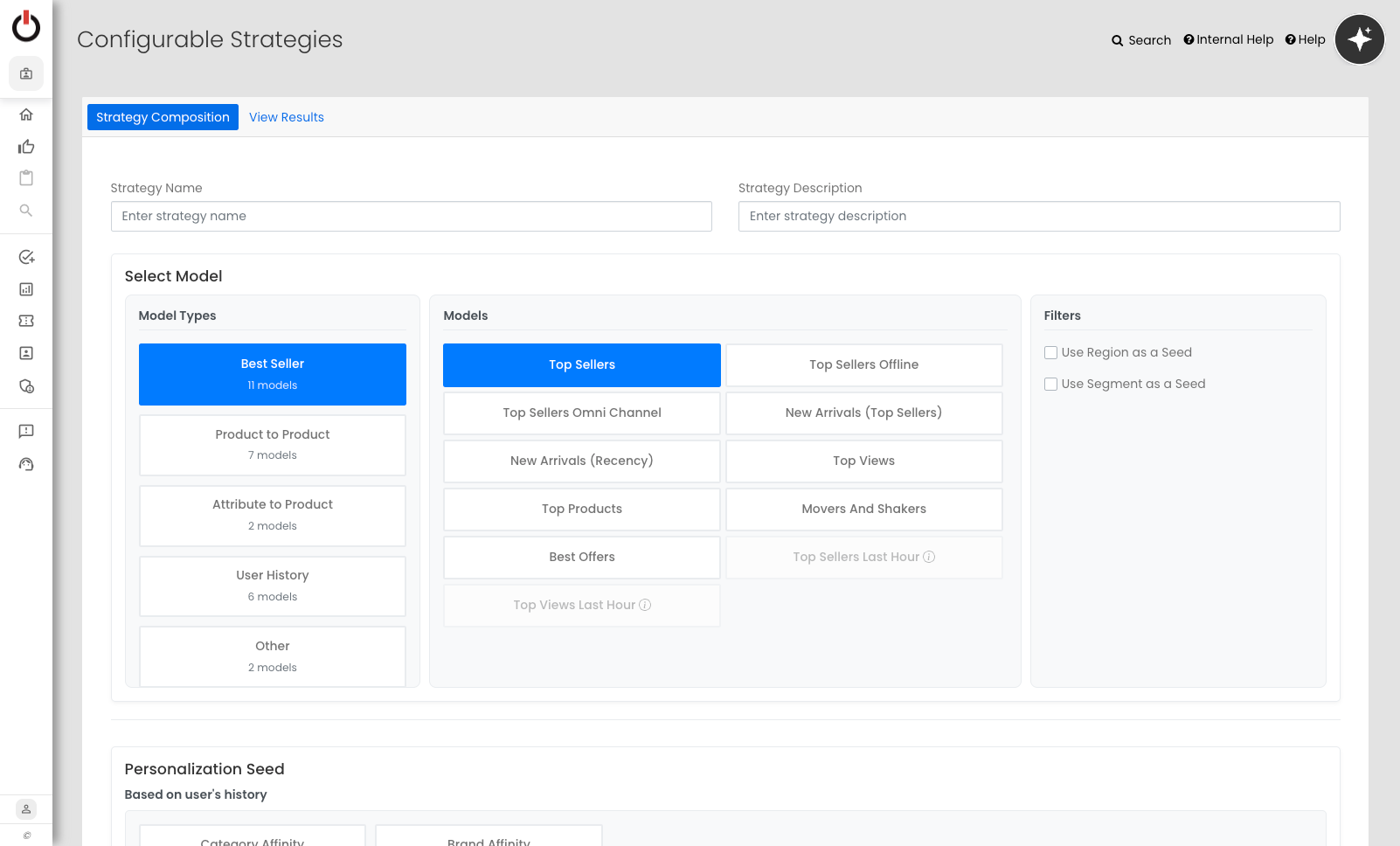
Redesigned Configurable Strategies Page for Faster Model Selection
The Configurable Strategies page has been redesigned to make model selection easier and more intuitive. As the number of available models grew, the earlier layout made it difficult to quickly find the right option. The new design organizes models into clear categories, simplifying strategy creation.
The Choose a Model section now guides users through selecting a model category first, then displays the relevant models for that category, with additional options shown separately. This update reduces clutter and helps teams find and configure strategies more efficiently.
The new Configurable Strategies page is currently hidden from general customer access. This feature is available as Early Access and can be enabled selectively.
Jira: ENG-31107
Engage
Enhanced Visual Editor for Dynamic Experiences
The visual editor for Dynamic Experiences has been improved to give marketers more control over content styling without developer support. Limitations around font customization have been reduced, making it easier to align experiences with brand guidelines.
The editor now supports both Text (WYSIWYG) and Edit Source modes, allowing users to switch between visual editing and direct HTML updates. Changes stay in sync with a real-time preview, and custom font family and size options are now supported.
These updates simplify content creation and help teams build consistent, brand-aligned experiences more efficiently.
Jira: ENG-31391
Social Proof
Product-Level Metrics Aggregation Using Attribute-Based Deduping
Social Proof now supports aggregating product metrics at a product level using a configurable deduping attribute. This addresses cases where multiple SKUs represent the same product but previously showed inconsistent social proof counts across variations.
A new configuration option allows merchandisers to enable aggregation when a short-name deduping attribute is defined. When enabled, metrics such as views, add-to-cart, and purchases are combined across related SKUs and returned as a single product-level count. If disabled, metrics continue to be tracked at the SKU level.
Jira: ENG-31437
Data Engineering
Co-occurrence Report – Support for Primary Categories
The Co-occurrence Report has been updated to correctly reflect primary categories defined in site configuration. With this improvement, the report now considers all primary categories defined for the site and generates co-occurrence data accordingly. This ensures more accurate analysis and helps teams better understand product relationships based on their primary category structure.
Jira: ENG-31600
Chatbot
Reorganized LLM Configuration Page for Better Clarity
The LLM Configuration page for Chatbot has been reorganized to make chat-related settings easier to understand and manage. Related options are now grouped into clear sections, improving readability and reducing configuration effort.
Settings are organized around product fields used for vector generation, filters applied to the vector database, products excluded from chat, and chat-specific LLM and agent configurations. This clearer structure helps teams configure Chatbot more efficiently and with greater confidence.
Jira: ENG-31668
Other Feature Enhancements
The following feature enhancements and upgrades have been made in the release version 26.02.
|
Jira # |
Module/Title |
Summary |
General Availability |
|---|---|---|---|
|
Enterprise Dashboard: Usability Enhancements to Low Code Flow and Editor |
The Low Code flow and editor have been improved to streamline page creation and editing. Deprecated and non-applicable page types have been removed from the page type selector, reducing clutter and improving clarity. Additional updates include clearer visibility into disabled items, expanded editor height for better editing experience, and the ability to copy text in View mode. Together, these changes make the Low Code experience more intuitive and efficient. |
22-Jan-26 |
|
|
Recommend: Improvements to Segment Models in Configurable Strategies |
Segment models in Configurable Strategies have been refined to improve accuracy and usability. Strategies now correctly consider the segments a user belongs to when determining whether a strategy should play, following the defined segment prioritization logic. For easier validation, the preview experience has also been enhanced. Users can now preview a strategy by providing either a user ID or a specific segment, making it simpler to test segment-based behavior without additional setup. |
22-Jan-26 |
|
|
Recommend: Label Updates on Configurable Strategies Page |
The labels on the Configurable Strategies page have been updated to improve clarity and reduce confusion. “Select Model Type” has been renamed to “Select Model”, and “Categories” has been updated to “Model Types”, making the selection flow easier to understand. |
22-Jan-26 |
|
|
Enterprise Dashboard: Recipe Catalog Review Experience for Merchandisers |
Merchandisers can now review the Recipe Catalog by product and locale to understand what shoppers may see. The experience allows viewing a list of applicable recipes with images and titles, and drilling into individual recipes to see full details such as ingredients, preparation steps, cooking instructions, and recommended products. Users can navigate between recipes, optionally preview ingredient recommendations for a specific user, and return to the recipe list easily. This enhancement provides better visibility into recipe content while keeping the catalog read-only and consistent across sites. |
22-Jan-26 |
|
|
Recommend: Region Added as Input for Recommend in Experience Optimizer |
Region is now available as a visitor input for Recommend within the Experience Optimizer configuration. This allows teams to tailor strategy selection based on regional differences, helping deliver more relevant recommendations across regions. |
22-Jan-26 |
|
|
Recommend / Streaming: Dashboard Configuration to Enable or Disable Streaming Recommend |
A new site-level configuration has been added to the dashboard to control whether Recommend uses the streaming item store. This allows teams to activate or deactivate streaming-based recommendations in a controlled manner. An additional query parameter can be used to enable streaming lookups temporarily without updating the site configuration, making it easier to validate data. With this enhancement, eligible new products can be recommended immediately without waiting for a catalog job run. |
22-Jan-26 |
|
|
Recommend / Streaming: Enhanced Itemstore Support for Category and Product Rollups |
Itemstore has been enhanced to include additional rollup data for category hierarchy, price quartiles, and product primary category information. This ensures that category ancestors, child relationships, and price distribution data are available for itemstore-enabled sites. The rollup data is now populated automatically when a checkpoint event is triggered, improving data completeness and consistency for downstream use cases. |
22-Jan-26 |
|
|
Science: Ensemble AI – Parallel Processing for LLM Jobs |
Ensemble AI LLM processing has been enhanced to run key parts of the job in parallel using batch-based execution. This improves throughput and significantly reduces processing time for large volumes of seed products. With this update, the system can handle higher scale more efficiently, supporting faster ensemble generation while maintaining stable and reliable job execution. |
22-Jan-26 |
|
|
Social Proof: Message-Level Reporting Expanded Across Categories with New Metrics |
Message-level reporting for Social Proof has been enhanced to provide broader visibility and deeper performance insights. Merchandisers can now view message performance across the entire catalog using a new All Categories option, removing the need to rely on individual category aggregation when products span multiple categories. The report has also been extended to include Units and Orders as additional metrics, alongside existing measures. This gives a more complete view of how each message performs in driving shopper actions. |
22-Jan-26 |
|
|
Social Proof: Social Proof Page Updated with New UX Design |
The Social Proof page has been refreshed with a new user experience aligned with the Ensemble AI list page design. This update focuses purely on visual and layout improvements, with no changes to existing business logic, resulting in a cleaner and more consistent interface across the platform. |
22-Jan-26 |
|
|
Dashboard Chatbot: Dashboard Chatbot – Improved Context-Aware Responses |
The dashboard chatbot has been enhanced to better understand and respond using the full context of an ongoing conversation. Previously, the chatbot did not consistently carry forward intent across related follow-up questions, which led to incomplete or incorrect responses. With this improvement, the system now reformulates each user query using both the current and prior messages before generating responses. This ensures follow-up questions are interpreted correctly, avoids incorrect assumptions, and improves accuracy when discussing specific APIs, parameters, or features. |
22-Jan-26 |
Bug and Support Fixes
The following issues have been fixed in the release version 26.02.
|
Jira # |
Module/Title |
Summary |
General Availability |
|---|---|---|---|
|
Enterprise Dashboard: Primary Category Assignment Updates Not Publishing Correctly |
An issue where Primary Category assignment changes were not consistently publishing to the backend has been resolved. Configuration updates now propagate correctly across environments when enabling or disabling primary category assignment using a product attribute. In addition, the warning message has been clarified to accurately state that changes take effect after the next full product catalog file is processed or an API update is received, reducing confusion around when updates are applied. |
22-Jan-26 |
|
|
Enterprise Dashboard: Product Slider Title and Count Alignment Issue |
An issue where product slider titles wrapped onto multiple lines while the item count appeared misaligned has been corrected. The styling has been updated to properly handle long text without affecting the count display, ensuring titles wrap as expected and the count remains correctly positioned. |
22-Jan-26 |
|
|
Enterprise Dashboard: Attribute Name Displayed Incorrectly in Affinity Graphs |
An issue where affinity charts displayed the attribute name as a value on the x-axis has been corrected. Attribute graphs now show only valid attribute values, ensuring clearer and more accurate visualizations. In addition, the tooltip text for Precision mode has been updated for clarity and is now fully functional, helping users better understand how affinity scores are adjusted. |
22-Jan-26 |
|
|
Chatbot: Chatbot Launch Icon Not Working on PDP Navigation |
An issue where the chatbot launch icon became unresponsive when navigating between product detail pages has been fixed. The chat container is now correctly cleaned up during page transitions, ensuring the launch icon remains functional without requiring a page refresh. |
22-Jan-26 |
|
|
Data Engineering: Social Proof Coverage Analysis Forward Fill Support |
An issue where Social Proof coverage analysis did not support forward fill has been addressed. Forward fill is now supported, ensuring more complete and continuous coverage data. In addition, the broadcast join logic has been optimized to improve performance, allowing rollup jobs to run within expected timeframes without timeout issues. |
22-Jan-26 |
|
|
Recommend: Configurable Strategy Replenishment Model Correction |
Configurable Strategies using the Replenishment model were returning products outside the shopper’s purchase history. The logic has been updated to use Replenishment in Purchased Products, ensuring only previously purchased, replenishable items are recommended. The issue has been fixed. |
22-Jan-26 |
|
|
Enterprise Dashboard: Search Boosting Warning Removed for Decimal Values |
A misleading UI warning was shown when decimal values were used in Boost/Deboost Search Boosting, even though the configuration worked correctly after publishing. This warning has been removed to avoid confusion and provide a clearer user experience. The issue has been fixed. |
22-Jan-26 |
|
|
Recommend: Geo location-Based Segmentation Issue |
Campaigns segmented by geolocation were not triggering correctly due to character encoding issues in city names, which affected segment matching. This caused Dynamic Experiences to fail even though the correct city was identified from the user’s IP address. The encoding handling has been corrected, and geolocation-based segmentation now works as expected without relying on historical segments. |
22-Jan-26 |
|
|
Discover: Pagination Issue in New Discover Browse API |
The Discover Browse API was returning more products than expected when pagination parameters were applied. Specifically, requests using start and rows together (for example, start=2&rows=2) returned additional items instead of honoring the requested page size. Pagination handling has been corrected, and the API now returns the expected number of products based on the provided start and rows values. |
22-Jan-26 |